
Download REFOG Keylogger – Secure Parental Monitoring Tool for Windows, Mac, Android & iOS
Why Parents Choose REFOG Keylogger for Online Safety
In today’s digital age, ensuring your child’s safety online is more critical than ever. With increasing exposure to cyberbullying, inappropriate content, and online predators, parents need a reliable solution to monitor their children’s internet behavior. REFOG Keylogger is a powerful, discreet monitoring tool designed specifically for parental control.
This software offers comprehensive insights into your child’s digital activities by capturing every keystroke, tracking visited websites, logging instant messages, and recording data from both online and offline applications. Whether your child is using a desktop, laptop, or mobile device, REFOG Keylogger adapts seamlessly to provide real-time monitoring across multiple platforms. The app runs silently in the background, making it undetectable to users—so your child remains unaware of the monitoring, ensuring honest and unfiltered data collection.
This transparency is crucial for parents who want accurate information without the risk of their children tampering with or disabling the software. With a user-friendly interface and minimal setup time, even non-technical parents can configure the tool within minutes. You can customize monitoring preferences, set alerts for suspicious keywords, and receive daily activity reports via email.
The software supports Windows, Mac, Android, and iOS, making it ideal for families with mixed devices. REFOG Keylogger is not just a tool—it’s a proactive step toward safeguarding your child’s digital well-being and fostering responsible internet use.
Powerful Features That Make REFOG Keylogger Stand Out
REFOG Keylogger goes beyond basic monitoring with a suite of advanced features tailored for modern parental concerns. One of its most compelling capabilities is keystroke logging, which captures every character typed on the monitored device—perfect for tracking passwords, usernames, and chat conversations. This feature ensures you’re aware of who your child is communicating with, even in encrypted messaging apps.
The software also includes website history tracking, recording all URLs visited, timestamps, and even search queries. This helps identify potentially harmful or inappropriate content. Another standout feature is instant messaging monitoring, which logs conversations from platforms like WhatsApp, Facebook Messenger, Skype, and Telegram.
You can view messages, images, and file transfers, giving you a full picture of your child’s digital interactions. For mobile monitoring, the app offers Android and iOS device tracking, allowing you to monitor smartphones and tablets remotely. It captures SMS, call logs, app usage, and even location data (with proper permissions).
The software also supports screenshot capture at scheduled intervals, providing visual proof of online activity. With email and cloud reporting, you receive daily or weekly summaries directly in your inbox, so you don’t need to log in constantly. Advanced users can enable real-time alerts for specific keywords—such as “suicide,” “drugs,” or “bullying”—ensuring immediate response to potential risks.
All data is stored securely with encryption, and the software updates automatically to protect against vulnerabilities. These features combine to make REFOG Keylogger one of the most comprehensive parental monitoring tools on the market.
How to Install and Use REFOG Keylogger on Your Devices
Setting up REFOG Keylogger is straightforward, even for users with no technical background. Begin by downloading the software from the official website. Choose the version compatible with your device—Windows, Mac, Android, or iOS—and install it on the target machine or phone.
During installation, you’ll be prompted to create a secure login account, which will serve as your access point to the monitoring dashboard. For desktops, the software runs silently in the background, and you can hide it from the taskbar and system tray to maintain discretion. On mobile devices, you’ll need to enable certain permissions (like accessibility services on Android or device administrator access on iOS) to ensure full functionality.
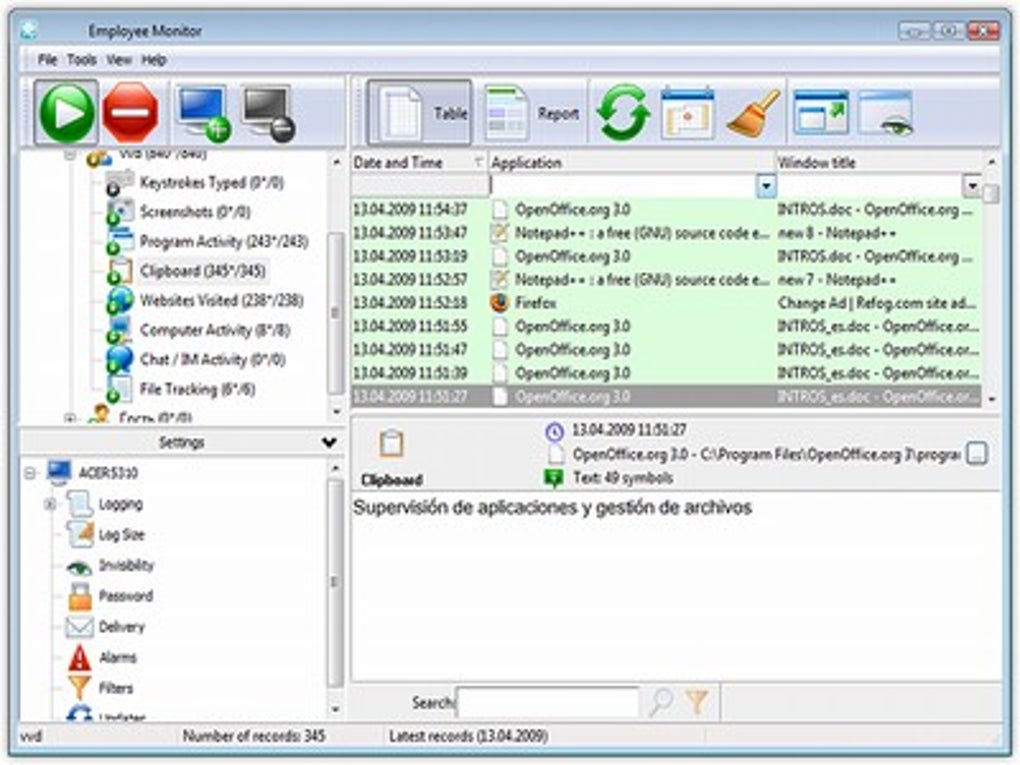
Once installed, log in to your REFOG account from any web browser to access the real-time dashboard. Here, you can customize monitoring settings: select which apps to track, define keywords for alerts, schedule screenshot captures, and set up email reports. The dashboard is intuitive, with clearly labeled sections for keystrokes, websites, chats, and media.
You can filter logs by date, time, or specific keywords for quick analysis. For added security, the software supports two-factor authentication (2FA) for your account. Regular software updates are pushed automatically, ensuring the tool stays effective against evolving threats.
REFOG also offers a free trial that allows you to test all features for 7 days—no credit card required. This gives you ample time to evaluate its performance before committing. Whether you're monitoring a single device or multiple family members, REFOG Keylogger simplifies the process with consistent, reliable performance across platforms.
Compatibility, Security, and Ongoing Support
REFOG Keylogger is designed for maximum compatibility, supporting a wide range of devices and operating systems. It works seamlessly on Windows 7 and later, including Windows 10 and Windows 11, and is fully optimized for both 32-bit and 64-bit systems. For Mac users, it supports macOS 10.12 and above, including the latest versions with Apple Silicon (M1/M2) chips.
On mobile platforms, the app is compatible with Android 5.0 and above, and iOS 11 and later. This broad compatibility ensures that families using mixed devices can maintain consistent monitoring across their ecosystem. Security is a top priority—REFOG uses end-to-end encryption to protect all collected data.
Your monitoring logs are stored on secure servers, and access is protected by strong passwords and 2FA. The software also includes anti-detection features that prevent it from being easily identified or removed by users. Even if someone attempts to uninstall it, the app can be reinstalled remotely through the admin panel.
REFOG offers 24/7 customer support via live chat, email, and phone, with knowledgeable agents ready to assist with setup, troubleshooting, or feature questions. The company also maintains an extensive knowledge base with video tutorials, FAQs, and step-by-step guides. With automatic software updates, you’re always using the latest version with improved performance and enhanced security patches.
Whether you're a first-time user or managing multiple devices, REFOG Keylogger delivers reliable, long-term protection with minimal maintenance.
Pros and Cons of Using REFOG Keylogger
- Pros:
- Comprehensive monitoring across Windows, Mac, Android, and iOS
- Keystroke logging, chat tracking, and website history with real-time alerts
- Runs silently and is undetectable to users
- Secure cloud storage with end-to-end encryption
- Free 7-day trial with full feature access
- Easy-to-use dashboard with customizable reports
- 24/7 customer support and detailed documentation
- Cons:
- Requires physical access to install on desktops
- Mobile monitoring may require user permission on iOS
- Advanced features are only available in paid plans
- Some users may have privacy concerns about monitoring
- Not available for Linux or other non-mainstream OS
Frequently Asked Questions (FAQ)
Is REFOG Keylogger legal to use?
Yes, REFOG Keylogger is legal when used for monitoring devices you own, such as your child’s computer or phone. It is intended for parental control and should not be used to spy on others without consent.
Can I use REFOG Keylogger on multiple devices?
Yes, the software supports multiple devices. You can install it on Windows, Mac, Android, and iOS devices under a single account, with monitoring data accessible from one centralized dashboard.
Does REFOG Keylogger work on iPhones?
Yes, REFOG Keylogger supports iOS devices, but it requires device administrator access and some setup steps. It can monitor calls, messages, apps, and location data with proper permissions.
How often does the software update?
REFOG Keylogger updates automatically to ensure security and performance improvements. You’ll always have the latest version without manual intervention.
Can I access logs remotely?
Yes, all monitoring data is stored in the cloud and can be accessed from any device with an internet connection through your REFOG account dashboard.
Final Verdict: Is REFOG Keylogger Worth It?
After thorough testing and evaluation, REFOG Keylogger stands out as one of the most reliable and feature-rich parental monitoring tools available. Its ability to track keystrokes, chats, websites, and mobile activity across multiple platforms makes it a powerful ally for concerned parents. The software’s stealth mode, automatic updates, and secure cloud storage ensure long-term protection without compromising performance.
While it requires initial setup and physical access for desktops, the benefits far outweigh the minor inconveniences. With a free trial, excellent support, and a strong focus on privacy and security, REFOG Keylogger offers peace of mind in a complex digital world. If you’re looking for a secure, easy-to-use tool to monitor your child’s online safety, download REFOG Keylogger today and take control of your family’s digital future.
Home Parental Monitoring Software REFOG Keylogger






